Gather your scattered days,
and AI starts to know you.
To-dos, events, underlined lines, habits, saved links, your journal. Bring the apps you've been juggling into Layers and every record lands on the day it happened. Then AI reads it all, gives advice drawn from your own past, and finds tastes you didn't know you had.
Just one email, on launch day.
What kind of day was yesterday?
How many apps would you have to open to answer that? Each app holds a piece of your day, and nowhere shows the whole thing.
- To-do app
- Calendar
- Photos
- Journal
- Bookmarks
- Habit tracker
Your records are scattered
Tasks in a to-do app, events in your calendar, underlines in your camera roll, links in bookmarks, feelings in a journal. One day, five places.
So you never look back
Remembering a day means opening app after app and piecing it together. It's too much work, so nobody does it.
And apps overwrite the past
Finished tasks disappear, unfinished ones get dragged into today, and a new star rating replaces the old one. Apps manage the present — they don't keep the day.
Layers answers not “what did I do?” but “what kind of day was it?”
01 — Bring it together
The apps you juggle, in one.
Layers holds everything that makes up a day. Turn on only what you need — turn something off and its records stay.
Journal
The page for each day. Moments, a diary entry, and every other record in time order.
Instead of a journal app
Plan
To-dos by day, week and month. Inbox, Someday and repeating tasks.
Instead of a to-do app
Apple Calendar
Reads the events from the calendar you already use and shows them on the day.
Keep your calendar, see it together
Library
Lines captured with your camera, with thoughts and reviews that build up per book.
Instead of screenshots of underlines
Habits
Fill a hexagon on the days you did it. It shows up on that day's page too.
Instead of a habit tracker
Scraps
Share a link from Safari, Instagram or YouTube and it lands on that day's page.
Instead of bookmarks
02 — See it on one page
Every record, on that day's page.
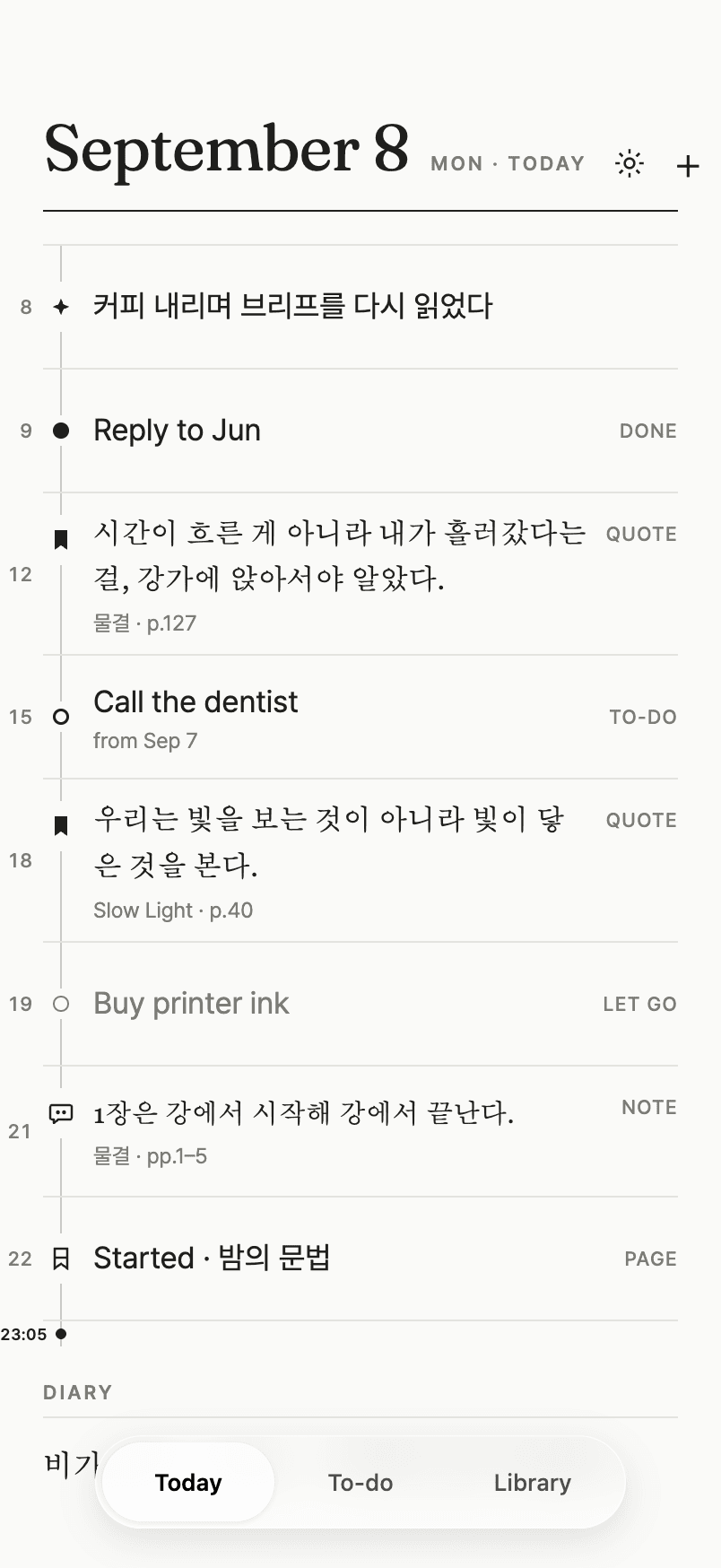
Wherever you wrote it, a record goes to its date. Finished tasks, events, underlined lines, habits, saved links, quick thoughts and your diary sit on one page, in time order.
- See the whole day without switching apps
- Modules are just ways in — everything ends up on the day
- Unfinished and let-go tasks stay on the day too
- 7커피 내리며 브리프를 다시 읽었다Moment
- 8아침 스트레칭Molecule · 10분Habit
- 9Reply to JunDone
- 10Team standupApple CalendarEvent
- 12시간이 흐른 게 아니라 내가 흘러갔다는 걸, 강가에 앉아서야 알았다.물결 · p.127Quote
- 14주간 계획 세우는 법YouTube · Paper HoursScrap
- 15Call the dentistfrom Sep 7To-do
- 19Buy printer inkLet go
비가 왔다. 프린터 잉크는 결국 안 샀다. 대신 물결을 마저 읽었다.
03 — Look back
With everything in one place, you finally look back.
Pick a date and the whole day opens. Last month's and last year's pages sit right above today, and you can scan a whole year at a glance. The day stays the same — seen from a new angle, it takes on a different color.
Same day, different light.
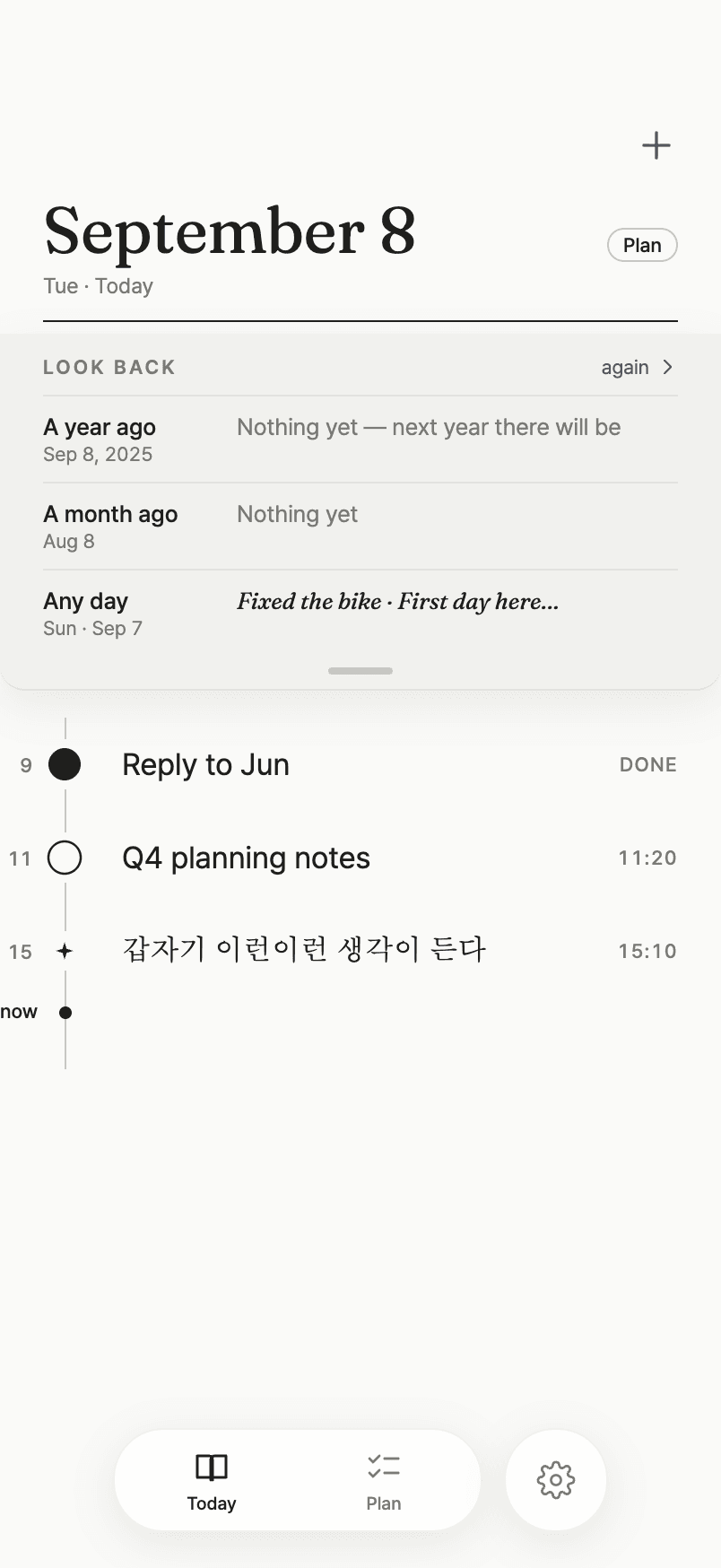
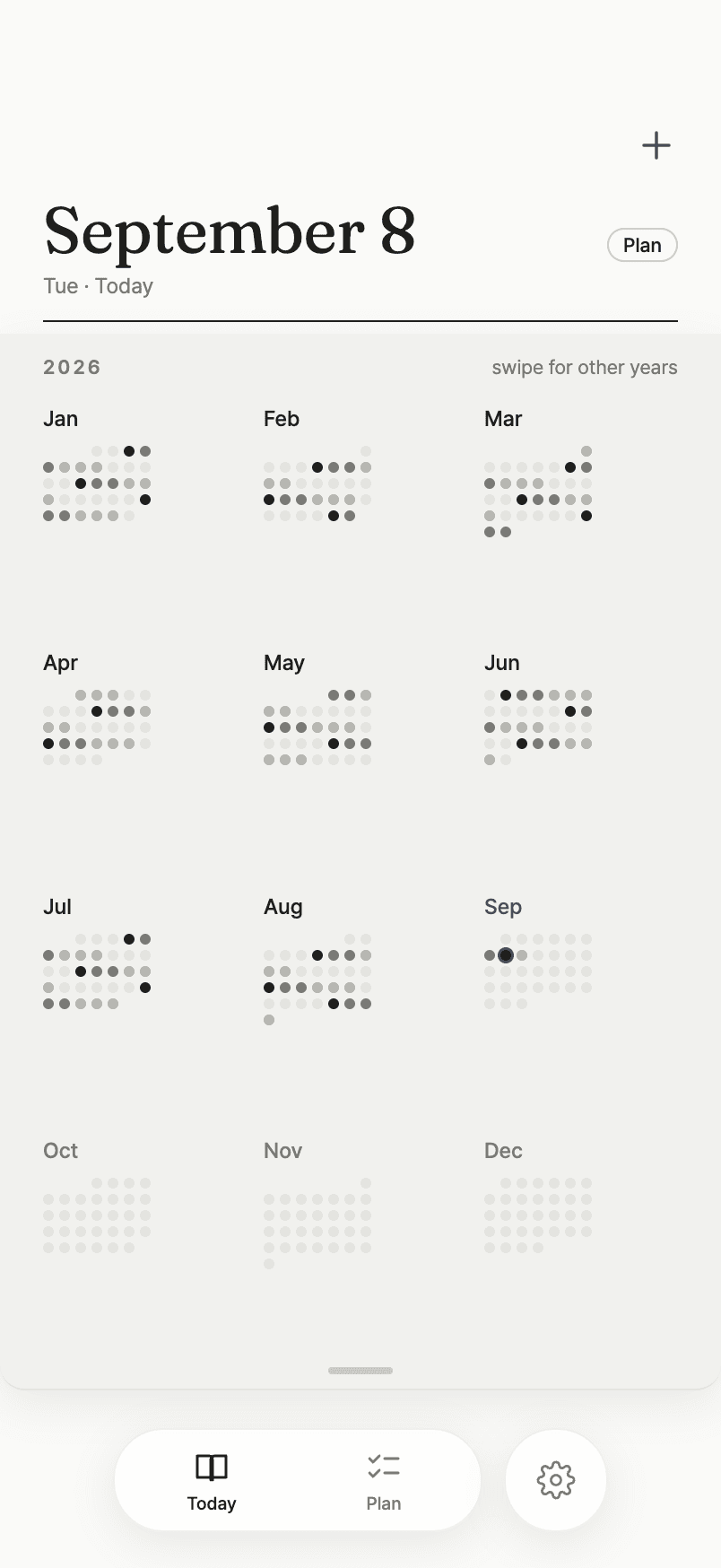
This day, a year ago
Open today and the same date from a month and a year ago comes with it — what you did, read and thought back then.
Add to past days
Add a thought to any day that's passed. The original stays as it was; new thoughts stack beneath it.
Link your records
Point to another day or record with @, and it leaves a trace there too. Open it months later and the connected thoughts are right there.
04 — Know yourself
AI reads what you've kept, and gets to know you.
The AI in Layers reads months and years of your to-dos, events, underlines, habits, links and journal together. Once records that used to be scattered across apps sit on the same dates, AI can finally understand your days as a whole.
Every answer comes with the days it's based on.
On days you took a morning walk, “light” showed up in your journal twice as often.
- Mar 4 · Habit
- Mar 12 · Journal
- +9 days
Your reading stopped in each of the three weeks with a deadline. This week, how about saving just ten minutes of your commute for a book?
- 3rd week of Jan
- 2nd week of Feb
- 4th week of Mar
Half of what you underlined this year is about time and memory. Next, try Carlo Rovelli's The Order of Time.
- 42 underlines
- 9 saved links
Understands you
What lifts your mood, which weeks your plans fall apart, which thoughts you keep coming back to. It finds the threads between your records and sums you up.
Advice from your own past
Not generic tips — answers drawn from your own history. It shows what helped at similar times, with the days that back it up.
Finds new tastes
From the lines you underline, the links you save and the books you finish, it spots tastes you haven't named yet and suggests what to read or try next.
Ask about yourself
“What was on my mind this time last year?” “Which month did I feel best?” Ask your records, and every answer leads back to the day it came from.
AI can only help you as much as it knows you. Layers is where that knowing builds up, day by day.
05 — Connect
The AI you already use gets to know you too.
Connect Layers to the AI assistant you use every day, like Claude or ChatGPT, and it answers from years of your records instead of a few chats. The connection uses MCP, the open standard for linking AI assistants to apps.
- It sees only what you allow — say, reading and plans but not your journal
- Your assistant's answers cite the Layers days they come from
- Plans and notes your assistant makes land on that day's page
- Disconnect any time, and it can't read anything more
Plan my prep for next month's job interviews — the way I work best.
Read from Layers · 312 to-dos · 84 journal entries · 57 underlines
Your records show your most focused weeks had just one big task each morning. So here's a four-week plan with one thing every morning. Want me to put it in your Layers Plan?
- 2nd week of May · Plan
- Jun 3 · Journal
Added to Plan · 20 tasks
06 — Reading
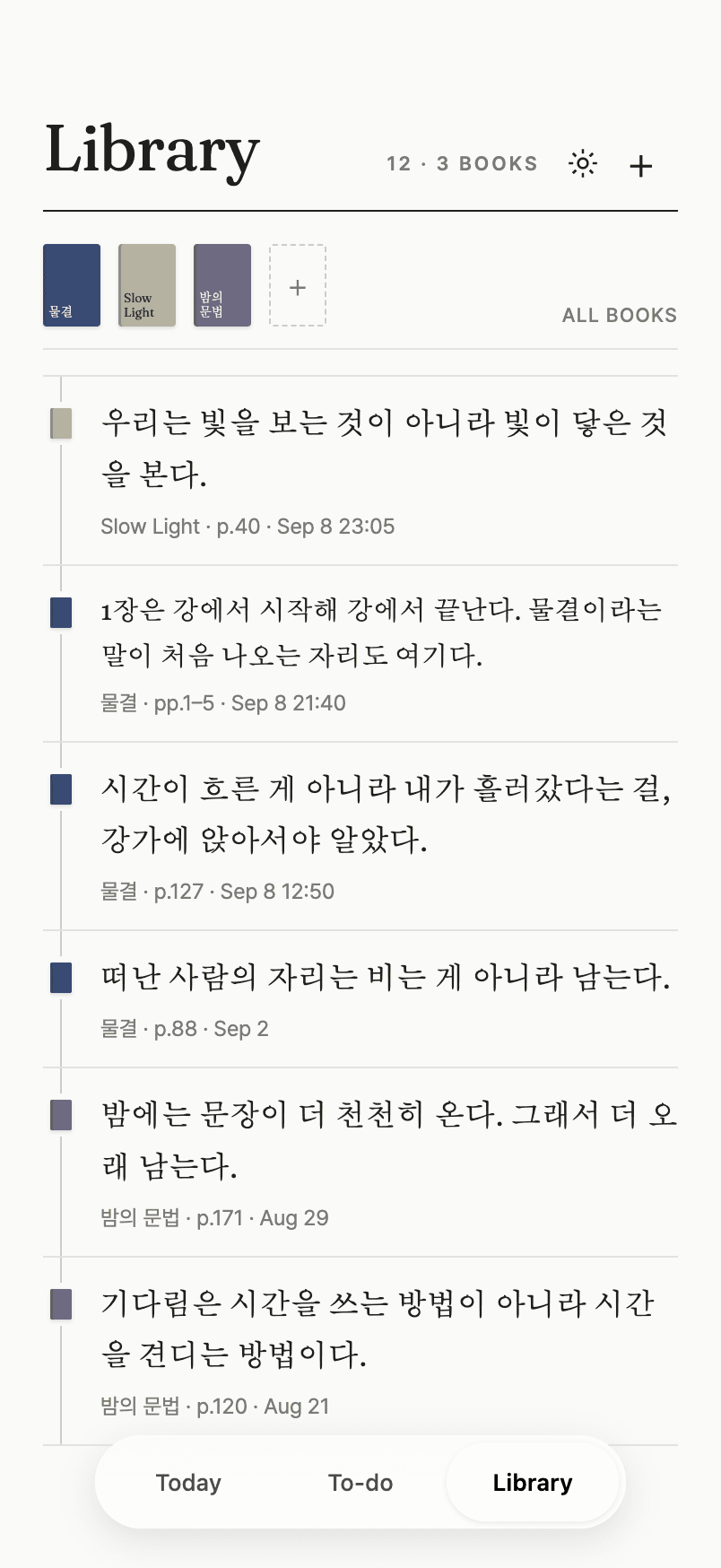
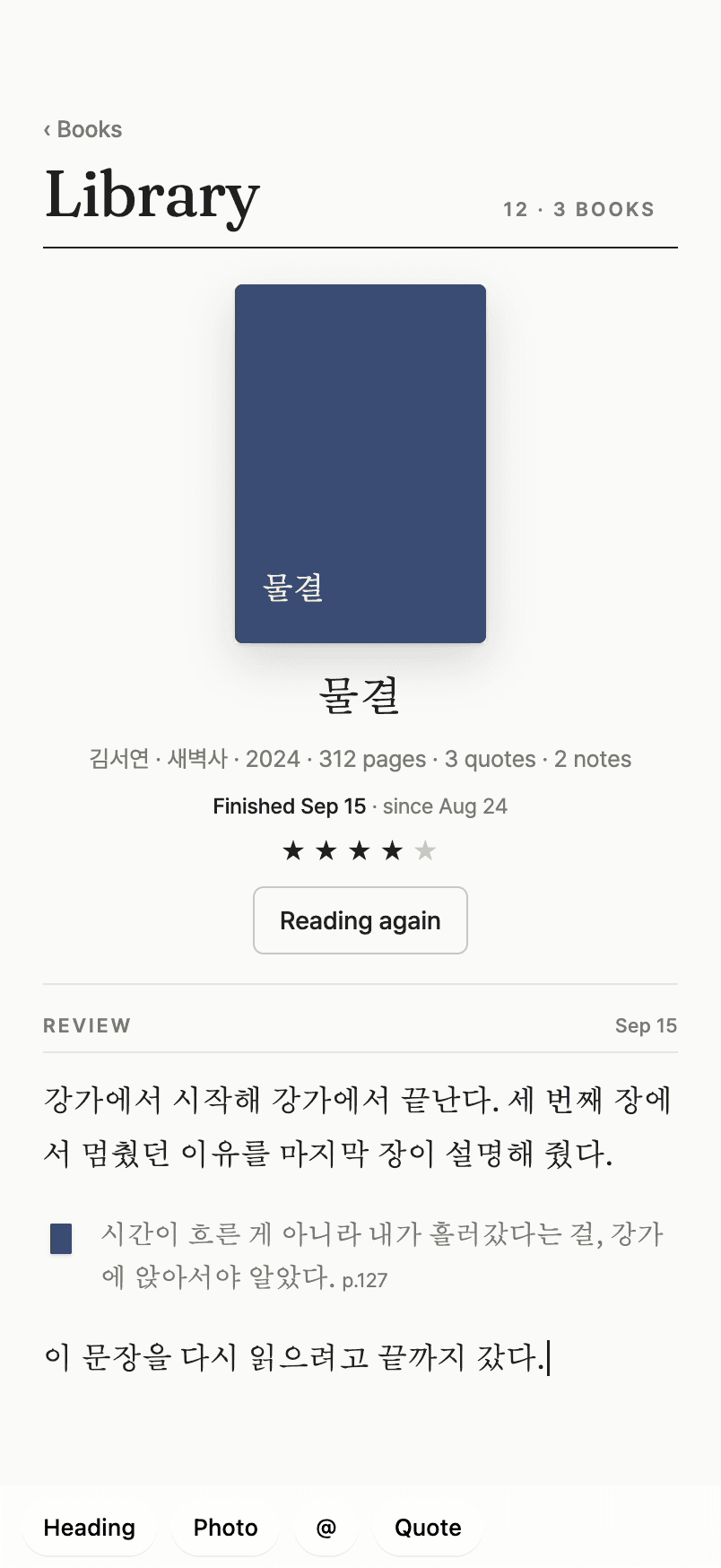
Reread a book, and your thoughts stack up instead of being overwritten.
Point your camera at a page and the sentence becomes text. Add thoughts under each line and a review when you finish. Years later, new impressions stack beneath the day you first read it — and every quote also appears on the page for the day you read it.
- Capture lines with Live Text — page number included
- Save a quote first, pick the book later
- Add thoughts beneath each line as a thread
- Every quote also appears on that day's Journal page
07 — Plan
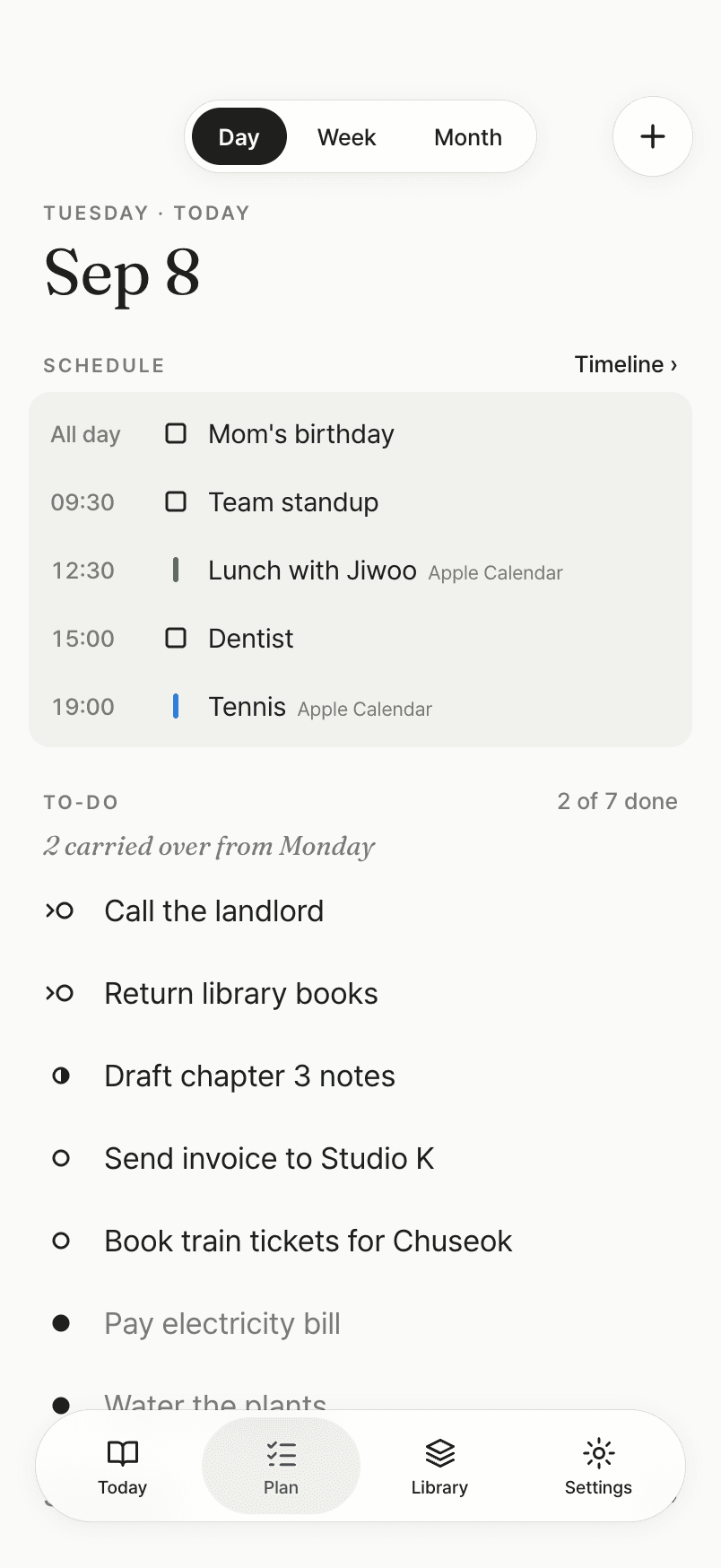
Plan like a bullet journal. Record it on the day.
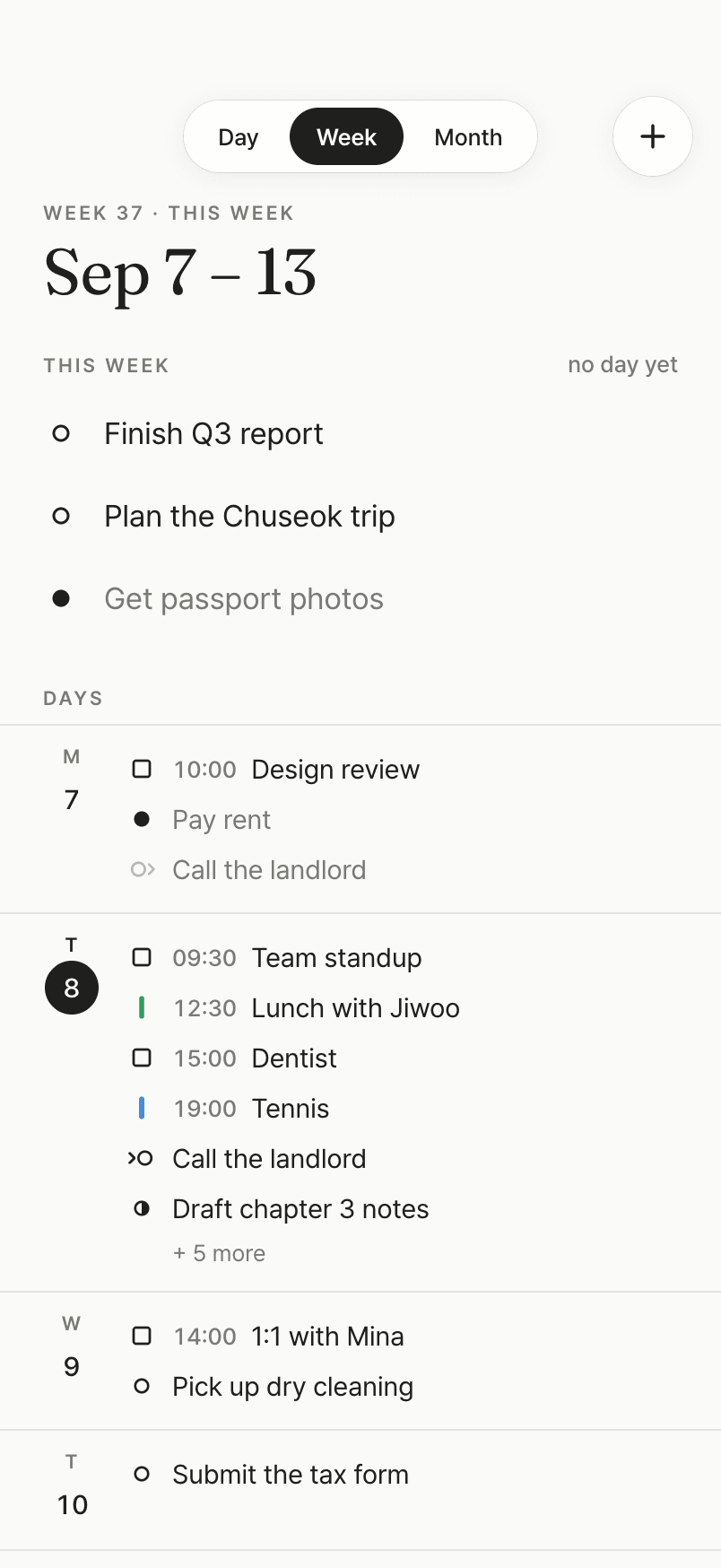
Look ahead by day, week and month, with your Apple Calendar events alongside. Finished and unfinished tasks both stay on their day — something to look back on later.
- Day, week and month views
- Inbox · Someday · Logbook — lists you already know
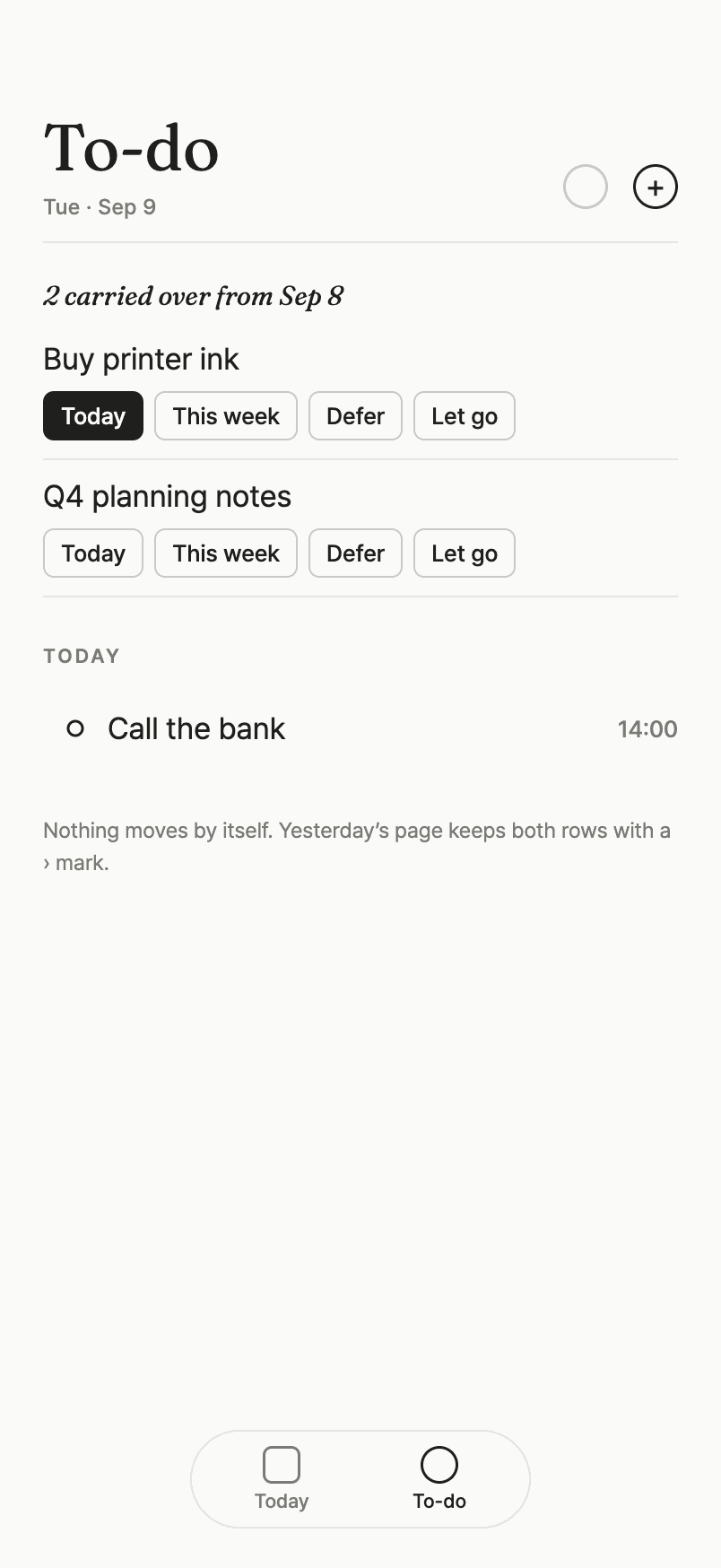
- Unfinished tasks stay on their day; you choose where they go next morning
- Repeating tasks that don't pile up when you miss one
You can only look back if the records are still there
So Layers is built to keep them.
The app never deletes your records
Nothing you didn't delete gets cleaned up or removed. Even deleted items wait 30 days in the trash.
The past isn't overwritten
Add to past days any time. What's already there stays as it was on that day.
One person's pages
No feeds, no sharing. Your records are stored on your devices and in your iCloud, and AI reads them only to answer you. They're never used to train AI.
Questions
When does it launch?+
Late October 2026, on the App Store. People on the waitlist hear first, on launch day.
Which devices?+
iPhone, iPad and Mac, synced with iCloud. Android and web aren't planned.
Where is my data stored?+
On your devices and in your iCloud, which also handles syncing between them.
Is my data used to train AI?+
No. AI reads your records only to answer you and to sum you up for you. Your records are never used to train AI models or shown to anyone else.
Can I turn the AI off?+
Yes, any time in Settings. Your records and every other feature stay as they are.
Which AI assistants can I connect?+
Any assistant that supports MCP, such as Claude or ChatGPT. Once connected, the records you choose are sent to that assistant, and its own policies apply from there.
Will you spam me?+
No. One email on launch day, that's it.
The more you keep, the better you know yourself.
We'll let you know the day Layers arrives on the App Store.
Just one email, on launch day.